Training resource hub

The New Editor:

Everything You Need to Get Started

Watch the walkthrough, keep the guide open while you work, and go deeper on the features your team touches every day.

Training & support 1
Watch + Learn

On-Demand Training

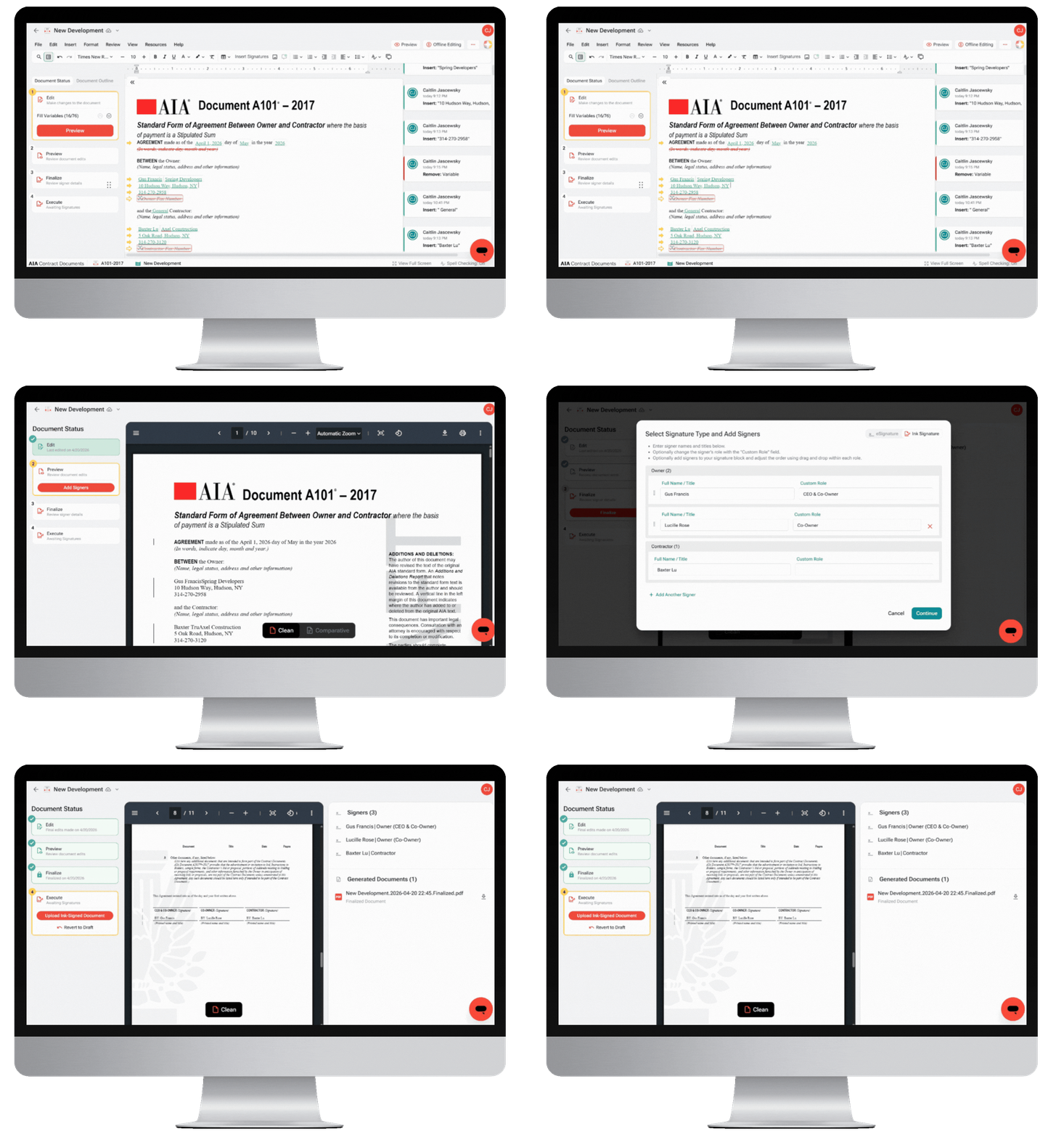
Join us for an introduction to Catina’s New Editor and learn how to confidently move your agreement through the complete document workflow. We’ll demonstrate how to:

Training & support 5

Navigate the editor’s newest enhancements

Training & support 5

Streamline review with tracked changes and comments

Training & support 5

Preview your document in flexible markup styles

Training & support 5

Configure signers and signature blocks

Training & support 5

Prepare for finalization and certify your document

Get Started

New Editor User Guide

Get the most out of Catina’s New Editor with step-by-step guidance for every stage of the agreement process. From editing and tracked changes to previews, finalization, and signatures, this guide helps you work more efficiently and move every document forward with ease.

1
Training & support 10

Edit

Make changes to the document

2
Training & support 11

Preview

Review document edits

3
Training & support 12

Finalize

Review signer details

4
Training & support 13

Execute

Awaiting signatures

BONUS
Training & support 14

Offline Editing + Custom Templates

Explore these advanced features

Need further guidance?

Our education team is here to help you have a smooth transition to the New Editor.